NOTE: The information below is provided for your convenience only and we cannot guarantee its accuracy. If necessary, please verify with us before purchasing.
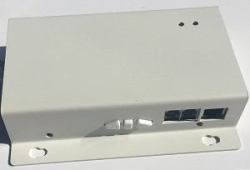
Sapphire AV RFR-IP projection screen accessoryIP Control Box
Optional controller to enable the screen to be controlled via IP.
Designed for seamless integration with the Sapphire range if can also be used for other brands of screen that have a four core 230v motor or can use zero volt contact closure.
It takes the IP command and then sets up the relays to open providing 230V to the product for a short period to enable the screen to drop or retract. Will also control garage doors which use the same type of motor.
This is also designed to accept an RS
232 input or zero volt contact closure meaning you can have the control by network or locally via traditional RS232 or contact closure.
By changing the dip switches you can also have the control coming via the network and use the RS232 or zero volt contact closure to also operate a Sapphire projector lift at the same time with the one command. Thus controlling two items with one command.
If you require any detailed help please send an email to
[email protected] or call us on 01633 895918 option 1
IP is set by default as 192.168.1.2 but can be changed before you attend site to install if required.
We have launched a simple App that comes pre-configured to work with the default IP of 192.168.1.2. Should you have changed the IP you simply open the app and change the IP to the correct one by clicking the white COG button..
However even if you are using a control system we recommend that you have the app on your phone as you will be able to test the device before programming the control panel. Alternatively may want the end user to have a back up device.