NOTE: The information below is provided for your convenience only and we cannot guarantee its accuracy. If necessary, please verify with us before purchasing.
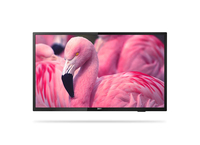
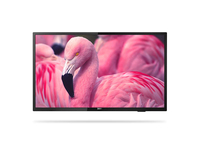
Philips 32HFL4014/12 hospitality TV 81.3 cm (32") HD 250 cd/m² Black 16 W32", 1366 x 768 p, 250 cd/m², 16 W, Dolby, DVB-T/T2/C, RJ-45, HDMI, USB 2.0, CI+, 26 W, 220-240 V, 50-60 Hz
Be seen. Brand the TV's UI with your logoYour Philips Professional TV offers a clear, easy-to-navigate user interface (UI), which you can customise with your own branding. Easily add your logo and colours to the search bar to increase the visibility of your brand.
MyChoice compatible. Built-in pay-to-view solutionOffer pay-to-view content in any situation - from a complete pay-to-access-all-channels model to selected premium content. MyChoice is an integrated solution that allows viewers to access pay-per-view channels via a code or a card.
IPTV. Provide channels over IP. Install your own UIProvide channels over IP. Install your own user interface (UI), which can be stored on a central server and sent to the TV over IP. Once the UI is on the TV, it can also be stored locally. You'll benefit from flexibility and rapid installation, whether you're personalising your Philips Pro System TVs or centralising system management.
CMND and Control. Operate, update, maintainRun your display network over a local (LAN or RF) connection. CMND & Control allows you to perform vital functions like controlling inputs, updating software and monitoring display status — whether you're in charge of one TV or more.
CMND and Create. Develop and launch your own contentTake control of your content with CMND and Create. A drag-and-drop interface makes it simple to publish your own content, whether it's a daily specials board or branded corporate information. Preloaded templates and integrated widgets ensure that your stills, text and video will be up and running in no time.

![Philips 32HFL4014/12 hospitality TV 81.3 cm [32"] HD 250 cd/m² Black 16 W](images/imgB43652580.jpg)