NOTE: The information below is provided for your convenience only and we cannot guarantee its accuracy. If necessary, please verify with us before purchasing.
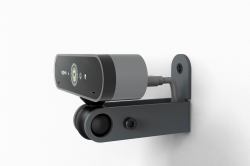
Heckler Design H587-BG video conferencing accessory Camera mount BlackADA Camera Mount for Logitech BRIO, Steel, Nylon
Versatility.Compatible with your favorite small camera, including Huddly Go, Huddly IQ, Logitech BRIO, Jabra Panacast, AVer CAM340, and many more.
Get creative.We know your installations can present new mounting challenges. ADA Camera Mount enables you to mount your favorite camera to most any surface, right-side-up, or inverted.
Any angle. You pick.With its patented ball joint you can lock in the perfect camera angle.
ADA compliance built-in.Safely install at any height in any location. ADA Camera Mount is carefully designed to prevent your camera from protruding more than four inches from the wall.
Cable management included.Optionally pass your USB-C cable through your wall without hassle. Just route the cable through a 1/2-inch hole. Our mount trims and hides the hole.
Above, below, or beside.Achieve the best view of your audience for each room. Install your camera above, below, or beside your displays then set the perfect camera angle.