NOTE: The information below is provided for your convenience only and we cannot guarantee its accuracy. If necessary, please verify with us before purchasing.
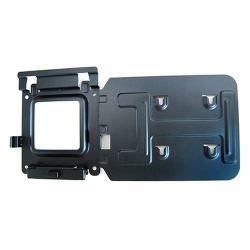
DELL 575-BBIVDock Mounting Bracket Kit
Easily mount your Dell™ Dock-WD15 or Dell Thunderbolt Dock-TB15 behind most Dell UltraSharp or P-Series monitors or to a wall, desk, or any flat surface with the Dell Docking Station Mounting Kit. Help create a clutter-free work environment at your desk or workstation by mounting your Dell Dock-WD15 or Dell Thunderbolt Dock-TB15 behind your compatible monitor or under your desk.
The kit comes with everything that you need to mount your Dell Dock-WD15 or Dell Thunderbolt Dock-TB15 behind a compatible Dell UltraSharp or P-Series monitor . The bracket easily attaches with four included mounting screws to the VESA mounting holes (100mm) underneath the monitor stand connector. Stand should be removed to attach the bracket, and then reattached to the bracket once the bracket is secured to the monitor. Mounting position for the Dell Dock-WD15 or Dell Thunderbolt Dock-TB15 will be offset to the side of the stand. Two included mounting screws are screwed into the bottom of your dock, which then allows it to slide easily onto the mounting bracket. It can easily be removed when needed. The kit can also be used to mount your Dell Dock-WD15 or Dell Thunderbolt Dock-TB15 on a wall, under a desk, or onto a table (with included mounting hardware). Two included mounting screws are screwed into the bottom of your dock, which then allows it to slide easily onto the mounting bracket. It can easily be removed when needed.